





When your laptop stops charging the night before a deadline, the problem is rarely just inconvenience. It can mean lost work, missed classes, delayed emails, and a lot of unnecessary stress. That is why laptop repair Ascot customers choose should be built around one thing first – getting the fault diagnosed properly, then repaired correctly without wasting time or money.
What good laptop repair in Ascot should actually look like
A proper repair service does more than swap parts and hope for the best. Laptops are compact, heat-sensitive machines with tightly packed components, and the same symptom can come from several different faults. A dead laptop might have a failed battery, damaged charging port, faulty power circuit, liquid damage, motherboard issue, or simply a software problem preventing normal start-up.
That is where accurate diagnostics matter. If a shop jumps straight to replacing the most obvious part, you can end up paying for a fix that never addressed the root cause. A professional technician will test the machine properly, inspect for underlying damage, and explain what has failed before any work goes ahead. That means fewer surprises and a far better chance of the repair lasting.
For local customers in and around Ascot, convenience matters too. You should be able to walk in, speak to someone who understands the fault, and get clear pricing before committing. If the issue is common, same-day repair may be possible. If it is more complex, you should still know what is happening and why.
The laptop faults we see most often
Some laptop problems build up slowly. Others happen all at once. Either way, the earlier they are checked, the better the chance of preventing a more expensive repair later.
Broken screens and display faults
A cracked screen is obvious, but not every display issue means the panel itself is damaged. Flickering, lines, black patches, dim backlights, and screens that work only at certain angles can also point to cable damage, hinge strain, graphics faults, or liquid ingress. Replacing the screen may solve it, but sometimes the real issue sits deeper inside the lid assembly or on the board.
Battery and charging problems
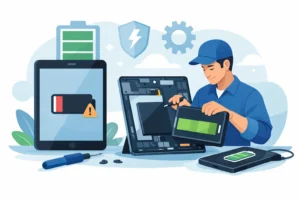
If your battery drains rapidly, the laptop shuts down at random, or the charger only works when held in a certain position, it is worth getting the machine checked before the damage spreads. A worn battery is common, especially on older devices, but charging faults can also involve the DC jack, charging IC, or power rail on the motherboard. The right repair depends on proper testing.
Overheating and sudden shutdowns
Laptops pull in dust over time, and blocked cooling systems are one of the biggest causes of performance problems. Fans work harder, internal temperatures rise, and the machine slows down or switches off to protect itself. In some cases, a full internal clean and thermal service is enough. In others, long-term heat exposure may already have affected nearby components.
Water damage
Spills are never as simple as they look. A laptop may seem fine after a cup of tea, coffee, or water lands on the keyboard, then fail days later once corrosion starts. The biggest mistake people make is continuing to charge or power on the machine. Liquid damage needs prompt assessment, cleaning, and testing. Sometimes the laptop is fully recoverable. Sometimes certain parts need replacing. It depends on how far the contamination has spread and how quickly the device is brought in.
Software faults and poor performance
Not every repair is hardware. A laptop that freezes, crashes, takes ages to boot, or constantly throws error messages may need operating system repair, virus removal, storage testing, or data recovery support. Slow performance can be caused by failing drives, damaged system files, malware, or simply a machine overdue for proper maintenance.
Why cheap fixes often cost more
It is understandable to look for the lowest quote, especially when replacing a laptop feels expensive. But there is a difference between good value and false economy.
Low-cost repairs often cut corners in one of three areas: diagnosis, parts quality, or workmanship. A poor-quality replacement screen may look dull or fail early. A loosely fitted charging port may work briefly, then break again. A quick clean after liquid damage may ignore corrosion already forming on the board. The repair appears cheaper at first, but the real cost shows up when the laptop returns with the same issue or a new one caused by the original fault being missed.
That is why warranty-backed workmanship matters. It shows the repairer is confident in both the parts used and the standard of the work. It also gives you reassurance that if something is not right, you are not left on your own.
How a professional laptop repair process should work
A good repair experience should feel straightforward from the start. You bring in the laptop, explain the issue, and the technician checks the symptoms against likely causes. If the fault is obvious, such as a damaged screen or failed battery, you may get a quick quote there and then. If not, diagnostic testing helps identify the exact problem before any parts are fitted.
Once the fault is confirmed, the repair should be explained in plain language. You should know what needs replacing, whether there are any risks, how long it is likely to take, and what it will cost. No hidden extras. No vague promises.
After the work is completed, the device should be tested properly. That includes checking charging behaviour, thermals, keyboard function, display performance, ports, and stability where relevant. A laptop should not leave the bench until the repair has been verified.
At iRepair, that practical approach matters because customers are not bringing in spare gadgets. They are bringing in devices they rely on every day for work, study, family life, and everything in between.
Laptop repair Ascot customers should not delay
Some faults get worse the longer they are left. A slightly loose charging port can eventually damage the board. A swollen battery can press against the trackpad or internal casing. An overheating laptop can shorten the life of the processor, battery, and storage. Water damage can continue corroding even when the machine appears to be running normally.
There is also the data side of the problem. When a laptop fails completely, the repair is no longer just about the hardware. It becomes about recovering files, accounts, coursework, photos, business documents, and stored passwords. Acting early can protect both the device and the information on it.
That does not mean every issue is an emergency, but it does mean unusual behaviour is worth checking. Strange fan noise, battery swelling, intermittent charging, repeated crashes, and visible liquid exposure should not be ignored.
Repair or replace – what makes sense?
This depends on the age of the laptop, its overall condition, and what you use it for. A newer machine with a broken screen or dead battery is often well worth repairing. The same goes for a good-quality business laptop or MacBook where replacement cost is high. On the other hand, if the machine is already very old, slow, and facing a major motherboard fault, replacement may be the better financial choice.
A trustworthy repair service will not push a repair that does not make sense. Sometimes the right advice is to save your money, recover your data if needed, and move to a newer device. Honest guidance is part of good service, especially for households and small businesses trying to balance cost with reliability.
Choosing a local repair shop with confidence
If you are comparing repair options, look beyond the headline price. Ask whether diagnostics are carried out properly, whether parts are genuine or OEM-grade where appropriate, whether there is a warranty, and whether you can speak directly to the technician about the fault.
It also helps to choose a local shop that works across more than one type of issue. A technician with experience in board-level repair, software faults, charging systems, screens, and water damage is more likely to see the full picture than someone offering only basic part swaps. That breadth of technical understanding can make the difference between a temporary fix and a proper one.
For customers in Ascot and nearby areas, local access has another advantage. If you need follow-up support, want an update, or have questions about the repair, help is close at hand rather than hidden behind a national call centre.
A few common questions
People often ask how long laptop repairs take. The answer depends on the fault and parts availability. Common repairs can often be completed quickly, while liquid damage and motherboard faults usually take longer because they need deeper testing.
Another common question is whether data will be safe. In many cases, yes, but no repairer should promise that before assessing the device. If the laptop has storage damage or severe liquid exposure, extra care may be needed to protect or recover files.
Customers also ask whether it is worth repairing an older laptop. Sometimes it is, especially when the fault is limited to the battery, screen, keyboard, fan, or charging socket. If several problems are stacking up at once, a technician should tell you honestly.
A reliable laptop repair service should leave you with clarity, not confusion. If your laptop is failing, slow, damaged, or refusing to charge, the best next step is a proper diagnosis from someone who will tell you exactly what is wrong and what it will take to put it right.